Each delegate object is really a wrapper around a method and an object to be operated on when the method is called.
The constructor takes an object and IntPtr value, in the constructor, these two arguments are saved in _target and _methodPtr private fields.
Tuesday, May 30, 2006


Sunday, May 21, 2006
FreshTag stop working.
I use FreshTags to help organize my blogs since the blog service I use (www.blogger.com) lacks the built-in support for this functionality. Honestly, I think the blogger service is kind of far behind of the other services offered by google.
For mysterious reason, the freshtags stop working two days ago, and I tried to use build page to experience different settings. It seems the samples it offered work perfectly, but after I change certain settings to mine, it just stops working.
I am not familar with the javascript code, and the javascript code the freshtags uses seems pretty complicated to me, so I didn't try to examine the code at the beginning. And it proved wrong, I should look into the code at the very beginning.
The issue is somehow, del.icio.us starts to offer all its feed only to query built in lowercase. At the beginning, I querid the tags using the upper case like this : http://del.icio.us/feeds/json/tags/yuren1978/GISresearch?sort=freq&count=100,
And after I changed this to the lower case : http://del.icio.us/feeds/json/tags/yuren1978/gisresearch?sort=freq&count=100,
Those tags are returned in correct way.
For mysterious reason, the freshtags stop working two days ago, and I tried to use build page to experience different settings. It seems the samples it offered work perfectly, but after I change certain settings to mine, it just stops working.
I am not familar with the javascript code, and the javascript code the freshtags uses seems pretty complicated to me, so I didn't try to examine the code at the beginning. And it proved wrong, I should look into the code at the very beginning.
The issue is somehow, del.icio.us starts to offer all its feed only to query built in lowercase. At the beginning, I querid the tags using the upper case like this : http://del.icio.us/feeds/json/tags/yuren1978/GISresearch?sort=freq&count=100,
And after I changed this to the lower case : http://del.icio.us/feeds/json/tags/yuren1978/gisresearch?sort=freq&count=100,
Those tags are returned in correct way.
Friday, May 19, 2006
Private and GAC deployment.
I did a little test over the .Net dll deployment testing two nights ago. I thought I needed to write it down.
The thing confused me a little bit is if I install the same version of a dll both in the GAC and Private path ( the application path), will the application look for the dll in the GAC or Private Path.
I made a simple test dll, and there is a test method which will display a message box. In the dll which I depoloyed to GAC, I will disaplay a message box "Called from GAC", in the private deployed dll, I will display a message box "Called from Local".
I also made a simple test application which will refer to the test dll.
If I install the dll into GAC using the GACUtil /i, it will dispaly the following message box.
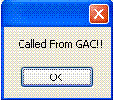
However, if I unistall the GAC , and then the test application will call the dll from the local private path, then the following message box will be displayed.
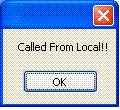
Conclusion, if an assembly is deployed both in the GAC and privately, the one in the GAC will be called firstly.
The thing confused me a little bit is if I install the same version of a dll both in the GAC and Private path ( the application path), will the application look for the dll in the GAC or Private Path.
I made a simple test dll, and there is a test method which will display a message box. In the dll which I depoloyed to GAC, I will disaplay a message box "Called from GAC", in the private deployed dll, I will display a message box "Called from Local".
I also made a simple test application which will refer to the test dll.
If I install the dll into GAC using the GACUtil /i, it will dispaly the following message box.
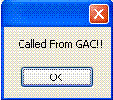
However, if I unistall the GAC , and then the test application will call the dll from the local private path, then the following message box will be displayed.
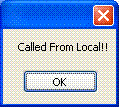
Conclusion, if an assembly is deployed both in the GAC and privately, the one in the GAC will be called firstly.
Wednesday, May 17, 2006
Non-generic - Generic mapping.
| Comparer | Comparer |
| Dictionary | HashTable |
| LinkedList | - |
| List | ArrayList |
| Queue | Queue |
| SortedDictionary | SortedList |
| Stack | Stack |
| ICollection | ICollection |
| IComparable | System.IComparable |
| IDictionary | IDictionary |
| IEnumerable | IEnumerable |
| IEnumerator | IEnumerator |
| IList | IList |
Tuesday, May 16, 2006
Love the DPack.
DPack. http://www.usysware.com/dpack/
The most useful features missing in Visual Studio.
Alt + S : Solution Browser.
Alt + U: File Browser.
Alt + G: Code Browser.
This will increase code efficiency dramatically.
Love the DPack. Also on my favorites are GhostDoc, and SmartPaste.
The most useful features missing in Visual Studio.
Alt + S : Solution Browser.
Alt + U: File Browser.
Alt + G: Code Browser.
This will increase code efficiency dramatically.
Love the DPack. Also on my favorites are GhostDoc, and SmartPaste.
Sunday, May 14, 2006
A good web programmer needs.
1. Good understading of javascript.
2. Good understanding of CSS.
3. Good understanding of Photoshop.
4. Good understanding of Database.
5. Good understanding of server-side programming like asp.net.
2. Good understanding of CSS.
3. Good understanding of Photoshop.
4. Good understanding of Database.
5. Good understanding of server-side programming like asp.net.
Friday, May 12, 2006
You cannot simply pass the reference to user control.
We have a program which will host multiple map controls, and each map control will have its own legend. It's fine to host muliple maps on different tabs, but it's a little bit tricky to host multiple legends. The end user will only want to see the legend associated with the current active map.
The first approach I tried is to create a form-level legend, and also create each legend inside each map control. And when the map becomes visible, I will do something like this:
frmMain.legend = currentMap.legend.
frmMain.Legend.Refresh().
I thought this will make the frmMain.legend point to the active map legend, and draw the active map legend.
Actually, this is not the case. Simple reference passing won't make the active map legend become the visible legend. And the OnPaint method of the active map won't be called. The paint message will still be sent to original legend.
This issue looks simple, but does take me a while to figure it out.
The first approach I tried is to create a form-level legend, and also create each legend inside each map control. And when the map becomes visible, I will do something like this:
frmMain.legend = currentMap.legend.
frmMain.Legend.Refresh().
I thought this will make the frmMain.legend point to the active map legend, and draw the active map legend.
Actually, this is not the case. Simple reference passing won't make the active map legend become the visible legend. And the OnPaint method of the active map won't be called. The paint message will still be sent to original legend.
This issue looks simple, but does take me a while to figure it out.
Thursday, April 27, 2006
Error Handling:
Error Handling:
There are two ways to hanlde the error, one is check the return code of each function, and based on the code returned, determine whether to continue or abort the program.
The other way is to throw an exception , and catch it in the central place, and then determine the appropriate behavior from there.
Thread consideration:
Exceptions should be handled in each sperate thread, if an exception is thrown in a different thread, and not catched in the same thread, it will disapper sliently, and will cause confusion in trouble shooting the issue.
There are two ways to hanlde the error, one is check the return code of each function, and based on the code returned, determine whether to continue or abort the program.
The other way is to throw an exception , and catch it in the central place, and then determine the appropriate behavior from there.
Thread consideration:
Exceptions should be handled in each sperate thread, if an exception is thrown in a different thread, and not catched in the same thread, it will disapper sliently, and will cause confusion in trouble shooting the issue.
Saturday, April 22, 2006
Status watching thread in windows services.
I have a windows service program which needs to integrate with another vendor's program. The thing troubling me is that i cannot set up a good test environment with them. The only thing I can do is logging every error my program encounters.
Since it's running as a windows service, so it won't stop even it finds some errors, and the loop just continues running. I put this service on a client's machine, and it generates 2 GB log data in one day. It's pretty embarassing.
So, what I ends up is to create another status watching thread monitoring the log file it generates, if it finds out the log file size is exceeding the certain size, it will send a stop message to the ServieMain() thread, which will stop the service.
Since it's running as a windows service, so it won't stop even it finds some errors, and the loop just continues running. I put this service on a client's machine, and it generates 2 GB log data in one day. It's pretty embarassing.
So, what I ends up is to create another status watching thread monitoring the log file it generates, if it finds out the log file size is exceeding the certain size, it will send a stop message to the ServieMain() thread, which will stop the service.
How ATL supports windows service.
If you want to create a service based on the ATL library, you normally will inherit the service from CAtlServiceModuleT which is included in atlbase.h
template
class ATL_NO_VTABLE CAtlServiceModuleT : public CAtlExeModuleT
{
......
int WinMain(int nShowCmd) throw()
}
When the the service control manager (SCM) is asked to start a service, through the StartService function, it starts the process using the CreateProcess function, it will go into the int WinMain(int nShowCmd) throw() inside the class.
int WinMain(int nShowCmd) throw()
{
if (CAtlBaseModule::m_bInitFailed)
{
ATLASSERT(0);
return -1;
}
T* pT = static_cast(this);
HRESULT hr = S_OK;
LPTSTR lpCmdLine = GetCommandLine();
if (pT->ParseCommandLine(lpCmdLine, &hr) == true)
hr = pT->Start(nShowCmd);
#ifdef _DEBUG
// Prevent false memory leak reporting. ~CAtlWinModule may be too late.
_AtlWinModule.Term();
#endif // _DEBUG
return hr;
}
This function is called by the main thread in the process, no additional thread is created yet. This function will in turn call the Start() function.
Inside the start function, it starts to hook up the real windows service stuff here, by checking the registery,
TCHAR szValue[MAX_PATH];
DWORD dwLen = MAX_PATH;
lRes = key.QueryStringValue(_T("LocalService"), szValue, &dwLen);
It will decide whether this is a service. [ In debug build, this won't be compiled and registered as a service to make life easier to do the debug.] If this is registered as a service, then a service table is created and StartServiceCtrlDispatcher is called to connect this service to the SCM.
SERVICE_TABLE_ENTRY st[] =
{
{ m_szServiceName, _ServiceMain },
{ NULL, NULL }
};
if (::StartServiceCtrlDispatcher(st) == 0)
m_status.dwWin32ExitCode = GetLastError();
StartServiceCtrlDispatcher establishes a connection that the SCM can use to send control commands to the service. StartServiceCtrlDispatcher will not return until the service has indicated that it has stopped. Once the connection to the SCM is established, StartServiceCtrlDispatcher creates a secondary thread that is the real starting point for the service. The second thread in this case is a static function called _ServiceMain, which in turn forwards the call to real ServiceMain function.
[MSDN:
]
The thread ServiceMain run is NOT the main thread referred here, the main thread is the controlling thread.
static void WINAPI _ServiceMain(DWORD dwArgc, LPTSTR* lpszArgv) throw()
{
((T*)_pAtlModule)->ServiceMain(dwArgc, lpszArgv);
}
The real ServiceMain is here:
void ServiceMain(DWORD dwArgc, LPTSTR* lpszArgv) throw()
{
lpszArgv;
dwArgc;
// Register the control request handler
m_status.dwCurrentState = SERVICE_START_PENDING;
m_hServiceStatus = RegisterServiceCtrlHandler(m_szServiceName, _Handler);
if (m_hServiceStatus == NULL)
{
LogEvent(_T("Handler not installed"));
return;
}
SetServiceStatus(SERVICE_START_PENDING);
m_status.dwWin32ExitCode = S_OK;
m_status.dwCheckPoint = 0;
m_status.dwWaitHint = 0;
T* pT = static_cast(this);
#ifndef _ATL_NO_COM_SUPPORT
HRESULT hr = E_FAIL;
hr = T::InitializeCom();
if (FAILED(hr))
{
// Ignore RPC_E_CHANGED_MODE if CLR is loaded. Error is due to CLR initializing
// COM and InitializeCOM trying to initialize COM with different flags.
if (hr != RPC_E_CHANGED_MODE || GetModuleHandle(_T("Mscoree.dll")) == NULL)
{
return;
}
}
else
{
m_bComInitialized = true;
}
m_bDelayShutdown = false;
#endif //_ATL_NO_COM_SUPPORT
// When the Run function returns, the service has stopped.
m_status.dwWin32ExitCode = pT->Run(SW_HIDE);
#ifndef _ATL_NO_COM_SUPPORT
if (m_bService && m_bComInitialized)
T::UninitializeCom();
#endif
SetServiceStatus(SERVICE_STOPPED);
LogEvent(_T("Service stopped"));
}
The first thing in service is to call RegisterServiceCtrlHandler to register a callback function that the control dispatcher, inside StartServiceCtrlDispatcher, can use to pass control requests to the service. RegisterServiceCtrlHandler also returns a handle that is used in calls to the SetServiceStatus function to update the SCM’s status information about the service.
template
class ATL_NO_VTABLE CAtlServiceModuleT : public CAtlExeModuleT
{
......
int WinMain(int nShowCmd) throw()
}
When the the service control manager (SCM) is asked to start a service, through the StartService function, it starts the process using the CreateProcess function, it will go into the int WinMain(int nShowCmd) throw() inside the class.
int WinMain(int nShowCmd) throw()
{
if (CAtlBaseModule::m_bInitFailed)
{
ATLASSERT(0);
return -1;
}
T* pT = static_cast
HRESULT hr = S_OK;
LPTSTR lpCmdLine = GetCommandLine();
if (pT->ParseCommandLine(lpCmdLine, &hr) == true)
hr = pT->Start(nShowCmd);
#ifdef _DEBUG
// Prevent false memory leak reporting. ~CAtlWinModule may be too late.
_AtlWinModule.Term();
#endif // _DEBUG
return hr;
}
This function is called by the main thread in the process, no additional thread is created yet. This function will in turn call the Start() function.
Inside the start function, it starts to hook up the real windows service stuff here, by checking the registery,
TCHAR szValue[MAX_PATH];
DWORD dwLen = MAX_PATH;
lRes = key.QueryStringValue(_T("LocalService"), szValue, &dwLen);
It will decide whether this is a service. [ In debug build, this won't be compiled and registered as a service to make life easier to do the debug.] If this is registered as a service, then a service table is created and StartServiceCtrlDispatcher is called to connect this service to the SCM.
SERVICE_TABLE_ENTRY st[] =
{
{ m_szServiceName, _ServiceMain },
{ NULL, NULL }
};
if (::StartServiceCtrlDispatcher(st) == 0)
m_status.dwWin32ExitCode = GetLastError();
StartServiceCtrlDispatcher establishes a connection that the SCM can use to send control commands to the service. StartServiceCtrlDispatcher will not return until the service has indicated that it has stopped. Once the connection to the SCM is established, StartServiceCtrlDispatcher creates a secondary thread that is the real starting point for the service. The second thread in this case is a static function called _ServiceMain, which in turn forwards the call to real ServiceMain function.
[MSDN:
When the service control manager starts a service process, it waits for the process to call the StartServiceCtrlDispatcher function. The main thread of a service process should make this call as soon as possible after it starts up. If StartServiceCtrlDispatcher succeeds, it connects the calling thread to the service control manager and does not return until all running services in the process have terminated. The service control manager uses this connection to send control and service start requests to the main thread of the service process. The main thread acts as a dispatcher by invoking the appropriate HandlerEx function to handle control requests, or by creating a new thread to execute the appropriate ServiceMain function when a new service is started.
The thread ServiceMain run is NOT the main thread referred here, the main thread is the controlling thread.
static void WINAPI _ServiceMain(DWORD dwArgc, LPTSTR* lpszArgv) throw()
{
((T*)_pAtlModule)->ServiceMain(dwArgc, lpszArgv);
}
The real ServiceMain is here:
void ServiceMain(DWORD dwArgc, LPTSTR* lpszArgv) throw()
{
lpszArgv;
dwArgc;
// Register the control request handler
m_status.dwCurrentState = SERVICE_START_PENDING;
m_hServiceStatus = RegisterServiceCtrlHandler(m_szServiceName, _Handler);
if (m_hServiceStatus == NULL)
{
LogEvent(_T("Handler not installed"));
return;
}
SetServiceStatus(SERVICE_START_PENDING);
m_status.dwWin32ExitCode = S_OK;
m_status.dwCheckPoint = 0;
m_status.dwWaitHint = 0;
T* pT = static_cast
#ifndef _ATL_NO_COM_SUPPORT
HRESULT hr = E_FAIL;
hr = T::InitializeCom();
if (FAILED(hr))
{
// Ignore RPC_E_CHANGED_MODE if CLR is loaded. Error is due to CLR initializing
// COM and InitializeCOM trying to initialize COM with different flags.
if (hr != RPC_E_CHANGED_MODE || GetModuleHandle(_T("Mscoree.dll")) == NULL)
{
return;
}
}
else
{
m_bComInitialized = true;
}
m_bDelayShutdown = false;
#endif //_ATL_NO_COM_SUPPORT
// When the Run function returns, the service has stopped.
m_status.dwWin32ExitCode = pT->Run(SW_HIDE);
#ifndef _ATL_NO_COM_SUPPORT
if (m_bService && m_bComInitialized)
T::UninitializeCom();
#endif
SetServiceStatus(SERVICE_STOPPED);
LogEvent(_T("Service stopped"));
}
The first thing in service is to call RegisterServiceCtrlHandler to register a callback function that the control dispatcher, inside StartServiceCtrlDispatcher, can use to pass control requests to the service. RegisterServiceCtrlHandler also returns a handle that is used in calls to the SetServiceStatus function to update the SCM’s status information about the service.
Sunday, April 16, 2006
Eclipse
Jon Skeet's Coding Blog : Visual Studio vs Eclipse
I started to use eclipse to view some open source geometry alrogrithm in JTS. I like it very much just after a couple of days of using it. Sometimes, I just feel an "open source" product is not any worse than those M$ products.
I am not saying I don't like VS.2005, yes, it's great. It has tons of features, and if know 50% of its feature, I will be very satisfied myself. But if there will be an open source editor which has those features the Eclipse has, a lot of people will probably use it just liking prefer FireFox to IE.
DPack is an wonderful addon for the visual studio 2005. It adds a lot features which Eclipse has and VS 2005 doesn't have.
The best two I like is Solution Browser (Alt + S) and Code Browser (Alt + G).
I started to use eclipse to view some open source geometry alrogrithm in JTS. I like it very much just after a couple of days of using it. Sometimes, I just feel an "open source" product is not any worse than those M$ products.
I am not saying I don't like VS.2005, yes, it's great. It has tons of features, and if know 50% of its feature, I will be very satisfied myself. But if there will be an open source editor which has those features the Eclipse has, a lot of people will probably use it just liking prefer FireFox to IE.
DPack is an wonderful addon for the visual studio 2005. It adds a lot features which Eclipse has and VS 2005 doesn't have.
The best two I like is Solution Browser (Alt + S) and Code Browser (Alt + G).
Thursday, April 06, 2006
Breaking on Exceptions.
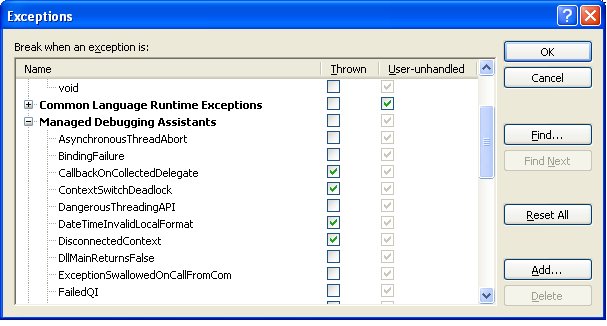
By default, the vs debugger will break if an exception is unhandled, but we can configure it to break when the exceptions are thrown. It is very helpful in some situations if we want to know exactly where the exception throws.
Under Debug Menu, select exceptions, you’ll see a tree display of all possible exceptions alongside checkboxes to indicate if the debugger should break when an exception “is thrown”, or only break if the exception is “user-unhandled”.
If you have not determined under what condition the exception occurs, or where the exception occurs, it's better to choose break on exceptions.
Sunday, April 02, 2006
Polygon intersection.
1> We need to decompose the two polygons into nodes and edge which make up the graph.
2> Combine the nodes and edges from those two polygons into one big graph, which is the initial graph we need to deal with.
3> Applies the sweep line intersection algorithm to get all the intersection points between the egdes from two polygons. The invariant is that the part of the overlay above the sweep line has been computed correctly.
4> If the event involves only edges from one of the two subdivsions, that is all; The event point is a vertex that can be re-used. If the event involves the edges from both subdivisions, we must link the doubly-connected edge lists of the two original subdivisions at the intersection point.
5> When an edge e passes through another polygon at point v, the edeg e must be replaced by two edges e1 and e2. The two half-edges become four half-edges. We create two new half-edge records whith v as the origin. The new edge e1 is represented by one new (with v as its origin) and one existing half-edge (with e's end point as its origin), and the same holds for e2.
6>
6-a> Link the edges at the end node of original edge e.
The most important part is that we have to link those edges with Prev() and Next() pointers. The Next() pointers of the two new half-edges each copy the Next() pointers of the old half-edge that is not its twin. The half-edges to which these pointers point must also update their Prev() pointer and set it to the new half edges().
6-b> Link the edge at the point v.
Consider the half edge for e1 that has v as its destiantion, it must be linked to the first half-edge, seen clockwise from e1, with v as its origin. The half edge for e1 with v as its origin must be linked to the first counterclockwise half-edge with v as its destination.
2> Combine the nodes and edges from those two polygons into one big graph, which is the initial graph we need to deal with.
3> Applies the sweep line intersection algorithm to get all the intersection points between the egdes from two polygons. The invariant is that the part of the overlay above the sweep line has been computed correctly.
4> If the event involves only edges from one of the two subdivsions, that is all; The event point is a vertex that can be re-used. If the event involves the edges from both subdivisions, we must link the doubly-connected edge lists of the two original subdivisions at the intersection point.
5> When an edge e passes through another polygon at point v, the edeg e must be replaced by two edges e1 and e2. The two half-edges become four half-edges. We create two new half-edge records whith v as the origin. The new edge e1 is represented by one new (with v as its origin) and one existing half-edge (with e's end point as its origin), and the same holds for e2.
6>
6-a> Link the edges at the end node of original edge e.
The most important part is that we have to link those edges with Prev() and Next() pointers. The Next() pointers of the two new half-edges each copy the Next() pointers of the old half-edge that is not its twin. The half-edges to which these pointers point must also update their Prev() pointer and set it to the new half edges().
6-b> Link the edge at the point v.
Consider the half edge for e1 that has v as its destiantion, it must be linked to the first half-edge, seen clockwise from e1, with v as its origin. The half edge for e1 with v as its origin must be linked to the first counterclockwise half-edge with v as its destination.
Thursday, March 23, 2006
Scroll in .Net user control.
Scroll in a user control is a pretty tricky. I used to have to override the WndProc procedure and call OnVScroll and OnHScroll there. It is not bad. But the whole idea of .Net is RAD,if you have to put a lots of P/Invoke methods, that defeats the whole idea.
I spent some time to do it in managed way. A couple of steps I have to follow is :
1> I have to set the AutoScroll = true.
2> I have to set the AutoScollMinSize to the drawing bitmap size. That way, if the client rectangle is smaller than this one. The scroll bar will show up.
3> Another feature I requested is programmatically scroll, when the mouse is moving out the client area, it should scroll the control. For this, I have to manually set the AutoScrollPosition property.
I spent some time to do it in managed way. A couple of steps I have to follow is :
1> I have to set the AutoScroll = true.
2> I have to set the AutoScollMinSize to the drawing bitmap size. That way, if the client rectangle is smaller than this one. The scroll bar will show up.
3> Another feature I requested is programmatically scroll, when the mouse is moving out the client area, it should scroll the control. For this, I have to manually set the AutoScrollPosition property.
Friday, March 10, 2006
8 hours to figure out a DCOM call.
I spent quite a lot of time in last two days try to figure out a DCOM calls from the Windows 2003 machine to the Windows 2000 machine.
I had written a component to generate the sketch image for the property card. The actual component is sitting on windows 2000 server, and the proxy is exported and installed on windows 2000 server (the web server) too.
WebServer running the COM+ proxy(windows 2000) - > Component Server (also Database Server) (windows 2003)
Since the webserver is not very stable, and we exported the websites to the new 2003 server.
Suddently, the asp page gave out the following error.
Server object error 'ASP 0178 : 80070005'
Server.CreateObject Access Error
It is not a rare error, and googling will find tons of posts on this issue. Most of posts are misleading until i found this
link
Basically, when the anonymous user (IUSR_WEBSERVERNAME) makes a request on 2000, the identity used is NTAUTHORITY\IUSR_WEBSERVERNAME . On the 2003 server, the indentity used is WEBSERVERNAME\IUSR_WEBSERVERNAME, which is rejected by the component server.
The link suggested a couple of workaround, but I don't want to change anything on the new webserver, so I just added IUSR_WEBSERVERNAME to the Component Server, and it worked very beatifully.
I had written a component to generate the sketch image for the property card. The actual component is sitting on windows 2000 server, and the proxy is exported and installed on windows 2000 server (the web server) too.
WebServer running the COM+ proxy(windows 2000) - > Component Server (also Database Server) (windows 2003)
Since the webserver is not very stable, and we exported the websites to the new 2003 server.
Suddently, the asp page gave out the following error.
Server object error 'ASP 0178 : 80070005'
Server.CreateObject Access Error
It is not a rare error, and googling will find tons of posts on this issue. Most of posts are misleading until i found this
link
Basically, when the anonymous user (IUSR_WEBSERVERNAME) makes a request on 2000, the identity used is NTAUTHORITY\IUSR_WEBSERVERNAME . On the 2003 server, the indentity used is WEBSERVERNAME\IUSR_WEBSERVERNAME, which is rejected by the component server.
The link suggested a couple of workaround, but I don't want to change anything on the new webserver, so I just added IUSR_WEBSERVERNAME to the Component Server, and it worked very beatifully.
Tuesday, March 07, 2006
Sweep line algorithm to computing the intersecting points.
The naive approach to compute the intersection points between line segments is use two for loops
for(int i = 0; i< count ; i++)
for( int j=i+1, j< count; j++)
{
compute the intersection between line[i] and line[j]
}
This is O(n*n) , not very efficient.
A better approach is to use the sweep-line approach. The sweep line will sweep from downwards. It will do some update at some event points.
Three types of event points:
1> The first type: the upper point of a line segment, we need to add that line segment into the set, and compute the intersection between this line segment and its immediate left and right neighbor.
2> The second type: the intersection point. The two line segments exchange position there, so we need to compute the intersection between those two line segments and thier new neighbors.
3> The third type: the end point of a line segment, this line segment will be deleted from the set. Its lef and right neighbor become immediate neighbor, we need to compute the intersections between them.
for(int i = 0; i< count ; i++)
for( int j=i+1, j< count; j++)
{
compute the intersection between line[i] and line[j]
}
This is O(n*n) , not very efficient.
A better approach is to use the sweep-line approach. The sweep line will sweep from downwards. It will do some update at some event points.
Three types of event points:
1> The first type: the upper point of a line segment, we need to add that line segment into the set, and compute the intersection between this line segment and its immediate left and right neighbor.
2> The second type: the intersection point. The two line segments exchange position there, so we need to compute the intersection between those two line segments and thier new neighbors.
3> The third type: the end point of a line segment, this line segment will be deleted from the set. Its lef and right neighbor become immediate neighbor, we need to compute the intersections between them.
Thursday, March 02, 2006
CSS styles.
Three types of CSS styles:
1> Classes:
1-a> .ClassName
Classes with . at the beginning are applied to different html controls.
1-b> ElmentName.ClassName
Classes prefixed with the element name are applied only to the certain element.
2> Elements:
Elements are applied to certain elements, the following elements are applied to h1, h2.. h6 elements.
h1, h2, h3, h4, h5, h6
{
margin: 2px 0 2px 0;
}
.ClassName Element
.PageNumbers span
{
padding-left: 3px;
}
#ElementId Element
#poster h2
{
font-size: 13px;
font-weight: bold;
color: #50700E;
}
Those should be applied to certain element under the specific class name and the element Ids.
3> Element IDs:
Element IDs starts with the special symbol "#", and it only applies to element with those IDs applied. Those are normally used to position the different web parts.
1> Classes:
1-a> .ClassName
Classes with . at the beginning are applied to different html controls.
1-b> ElmentName.ClassName
Classes prefixed with the element name are applied only to the certain element.
2> Elements:
Elements are applied to certain elements, the following elements are applied to h1, h2.. h6 elements.
h1, h2, h3, h4, h5, h6
{
margin: 2px 0 2px 0;
}
.ClassName Element
.PageNumbers span
{
padding-left: 3px;
}
#ElementId Element
#poster h2
{
font-size: 13px;
font-weight: bold;
color: #50700E;
}
Those should be applied to certain element under the specific class name and the element Ids.
3> Element IDs:
Element IDs starts with the special symbol "#", and it only applies to element with those IDs applied. Those are normally used to position the different web parts.
Sunday, February 26, 2006
Visual Studio .NET plugin for Workspaces source control
A good practive to organize the solution and projects when working with VS.Net is you should always locate the solution file at a level higher in the directory hierarchy than any of the projects in contains. If we create proj1 in c:\temp\test1, we should always put the solution file one level higher, such as c:\temp.
This is very important, otherwise, the OK button will be disabled and you won't be able to add the projects into the workspace. This takes me a while to figure it out.
A good resources for Visual Studio .Net plugin.
Visual Studio .NET plugin for Workspaces source control
This is very important, otherwise, the OK button will be disabled and you won't be able to add the projects into the workspace. This takes me a while to figure it out.
A good resources for Visual Studio .Net plugin.
Visual Studio .NET plugin for Workspaces source control
Saturday, February 25, 2006
Control the look and feel in Asp.Net.
1> Add a folder called "App_Themes" under the website.
2> Create a different folder under the App_Themes, and each one is a different theme name.
something like this
App_Themes
---- Default
-----Summer
-----Winter
3> In the web configuration file,
4> Add the css files and skin files under the different folder.
2> Create a different folder under the App_Themes, and each one is a different theme name.
something like this
App_Themes
---- Default
-----Summer
-----Winter
3> In the web configuration file,
4> Add the css files and skin files under the different folder.
Thursday, February 23, 2006
Dispose pattern in C#.
I reviewed some chapters on the dispose pattern on Jeff's book. I really enjoyed reading this book, everytime I read it, it gave me some new thoughts.
A couple of points :
1. If you class has unmanaged resources, you have to implement IDispose pattern to ensure that resources are cleaned up properly. The GC only takes care of the memory, not the other nasty resources issues.
2. The way to implement it:
2-a. Implement a private/protecte methods like Dispose(bool disposing), if the disposing is true, you can access both managed resources which are not collected by GC yet and unmanaged resources. If it's set to false, you cannot access other managed resources since they have the possiblity to have been collected by GC already.
2-b. Implement a Dispose() method, and call Disposing(true), since we are sure it's an explicitly cleaning up.
2-c. Implement a Dispose() method optianlly,and call Disposing(true), since we are sure it's an explicitly cleaning up.
2-d. Implement the finalize() method, and call Disposing(false) . In C#, this finalize method is implemented as a destructor format, though it's not a destructor by any means.
A couple of points :
1. If you class has unmanaged resources, you have to implement IDispose pattern to ensure that resources are cleaned up properly. The GC only takes care of the memory, not the other nasty resources issues.
2. The way to implement it:
2-a. Implement a private/protecte methods like Dispose(bool disposing), if the disposing is true, you can access both managed resources which are not collected by GC yet and unmanaged resources. If it's set to false, you cannot access other managed resources since they have the possiblity to have been collected by GC already.
2-b. Implement a Dispose() method, and call Disposing(true), since we are sure it's an explicitly cleaning up.
2-c. Implement a Dispose() method optianlly,and call Disposing(true), since we are sure it's an explicitly cleaning up.
2-d. Implement the finalize() method, and call Disposing(false) . In C#, this finalize method is implemented as a destructor format, though it's not a destructor by any means.
Subscribe to:
Posts (Atom)